
• A place to try out ideas before taking them to work: what I wanted to validate, what it has taught me and what comes next
A Lab at Home: Kubernetes on Three Raspberry Pi
Table of Contents
- Context
- The ideas I wanted to test
- Deploying without opening the door
- What the lab has taught me
- What comes next
- Reflection
To me, a homelab is exactly that: a lab. A place to try out ideas before taking them to work.
At work there’s little room to experiment. Systems have users, changes have consequences and, rightly so, it’s hard to justify trying something “just to see what happens”. But many of the decisions we end up making there start as a hunch that nobody has seen work yet.
The homelab is where those hunches can fail without anything happening.
Here I can build a cluster, break it on purpose, change my mind three times in an afternoon and run into the problems that never show up in the documentation. And when something works, I get to work with more than an opinion: I get there with the experience of having run it.
1. Context
I didn’t build the homelab to learn how Kubernetes, Terraform or Cloudflare work. I already knew that. I built it to have a place where I could validate specific ideas before defending them at work: does a highly available control plane hold up on cheap hardware? Can you publish on the internet without opening a single port? Can you deploy from GitHub without letting GitHub into your network? How far can you take managing absolutely everything as code?
That’s why, even though it’s a lab, I run it with production rules: no manual changes, everything described as code, metrics and alerts from the start, and a security model I could explain out loud without blushing. If you test in toy conditions, your conclusions are toys too.
And since an empty lab doesn’t prove much, today it serves this very blog and dpp, a flight search engine I write about in another post.
2. The ideas I wanted to test
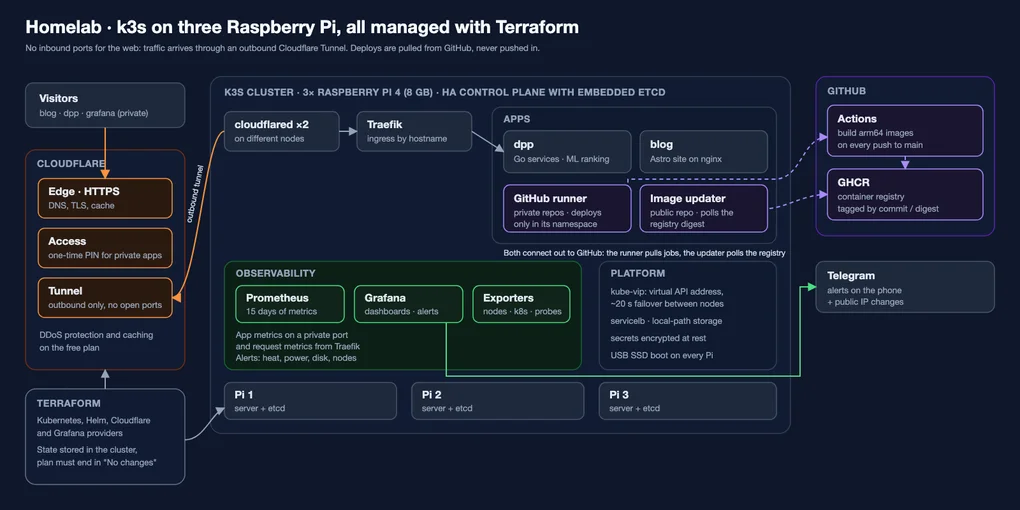
The big picture: Cloudflare in front, the cluster in the middle and GitHub on the right.
The first idea was high availability on modest hardware. Three Raspberry Pi 4 with 8 GB, booting from SSDs over USB, form a k3s cluster with the control plane spread across all three and embedded etcd. The API hangs from a virtual IP managed by kube-vip. The hypothesis was that I could lose a Pi without losing the cluster, and the only way to believe it was to check: I switched nodes off on purpose and the IP moved to another one in about twenty seconds.
The second, not opening a single web port. The cluster itself opens a tunnel to Cloudflare, and Cloudflare receives the visits and sends them through that tunnel. Whatever shouldn’t be public, like Grafana, sits behind Cloudflare Access, which asks for a code sent to my inbox before you even reach Grafana’s login. I wanted to know whether a model like that, with nothing exposed, was comfortable day to day. It is.
The third, taking “everything as code” all the way. Terraform manages namespaces, applications, Helm charts, DNS, the tunnel, access policies and even Grafana’s dashboards and alerts. With one rule I try not to break: after applying a change, the next plan has to say “No changes”. If it doesn’t, something changed behind my back and I want to know what.
And the fourth, that observability wouldn’t be an afterthought. Prometheus collects metrics from the nodes, from Kubernetes, from network probes, from Traefik and from the applications themselves, and Grafana alerts me on Telegram if a Pi stops responding, the temperature goes up, there’s under-voltage, a disk fills up or I lose internet.
3. Deploying without opening the door
This was the idea I was most eager to test, because it’s a problem that shows up at any company: I wanted a git push to end up deployed on its own, but without letting GitHub into my cluster.
The answer was to split repositories by how much I trust them.
Private repositories use a GitHub Actions runner that lives inside the cluster. It’s the runner that connects to GitHub to ask for work, never the other way around, and its permissions are limited to updating deployments in its own namespace. It can’t read secrets or touch anything else.
For public repositories, like the one behind this site, that wasn’t good enough. A self-hosted runner on a public repository is almost an invitation: anyone could try to run code on my hardware with a pull request. So there, the cluster doesn’t talk to GitHub Actions at all. GitHub builds the image and pushes it to the registry, and a small process in the cluster checks every five minutes whether there’s a new version. If there is, it rolls it out.
It’s less immediate, sure. But I’d rather wait five minutes than leave a door open.
4. What the lab has taught me
This is what a lab is for: surfacing the problems that no tutorial mentions. And, funnily enough, none of them was the one I expected.
The first one came over a weekend. One of the Pi ended up half alive: it answered ping, accepted the SSH connection and then dropped it, and k3s had stopped. The cause turned out to be the disk’s USB enclosure, which stopped writing in UAS mode. Disabling UAS fixed it, but what I take away is something else: without the system logs stored on disk I would never have known what happened. They’ve been persistent ever since.
The second has happened to me twice, with two different components: first with Grafana and then with a small container that sits next to Prometheus. In both cases the memory limit was so tight that the page cache of their own binary didn’t fit, so the system kept re-reading it from disk over and over. In the second case it got to around 290 MB/s, saturated the Pi’s disk and knocked Prometheus out for minutes at a time. The fix wasn’t tuning anything: it was giving them room.
The worst part of that episode wasn’t the failure itself, but that the alerts went quiet. When Grafana couldn’t query Prometheus, the rules silently switched to “all good”. An alerting system that doesn’t warn you when it can’t watch is almost worse than having none. Now, if a query fails, the alert fires. Of everything that has come out of this lab, that’s probably what I take to work the most.
The third one was subtler. I deployed a new version of dpp and the site kept behaving like the old one. Cloudflare had kept the old JavaScript and was still serving it alongside the new HTML. Now HTML and code are served without caching, and only files with a fingerprint in their name are cached.
And the last one was almost a lesson in humility. The Terraform state, the file that says what Terraform manages and what it doesn’t, lived on a single laptop. The day I needed to apply a change from another machine, I couldn’t. I rebuilt it from the real infrastructure with import blocks, reviewed field by field every change Terraform proposed before applying it, and moved it into the cluster itself.
A single copy of something important isn’t a copy: it’s a risk.
5. What comes next
This lab has an obvious limit: the hardware. Three Raspberry Pi go a long way, but not all the way, and I still need a bit more hardware to make this even more interesting.
I’m fairly clear about where I’d start: an inference PC. I work with language models every day, and a machine with a GPU at home would let me try open models locally, measure real latency and cost, and experiment with agentic workflows without depending on anyone. Which is, after all, the whole idea: try it here before defending it there.
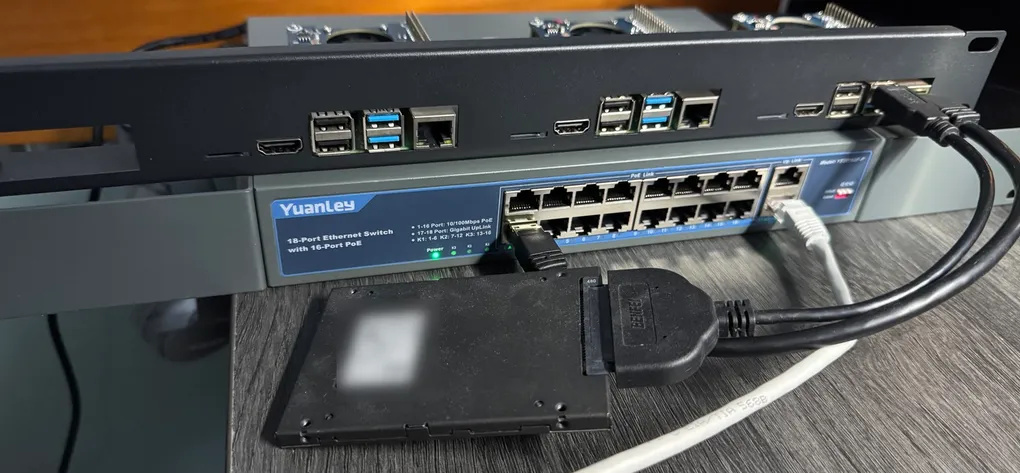
And, while I’m at it, replace the switch: the current one negotiates 100 Mb/s and, as soon as there’s more than three Raspberry Pi, it’s going to show.
6. Reflection
It isn’t a perfect system, and I’d rather say it myself. All the monitoring lives on a single Pi, so if that one goes down I’m flying blind, and the Terraform state still has no copy outside the house. Both are on the list.
But it does its job. Each of those failures is something I won’t have to discover for the first time at work, and every idea that survives here gets there with some experience behind it. Some will end up in production and others will stay at home, and that’s fine.
And perhaps that’s my conclusion. A lab isn’t there to prove you right; it’s there to let you be wrong cheaply. Better to break a three-Raspberry-Pi cluster at home than to find out the same thing with users on the other side.